Sheet Solutions Master
Comprehensive step-by-step solutions with handwritten notes
This section covers the fundamental calculations for Transmission, Propagation, and End-to-End delays.
Part 1: Basic Delay Analysis
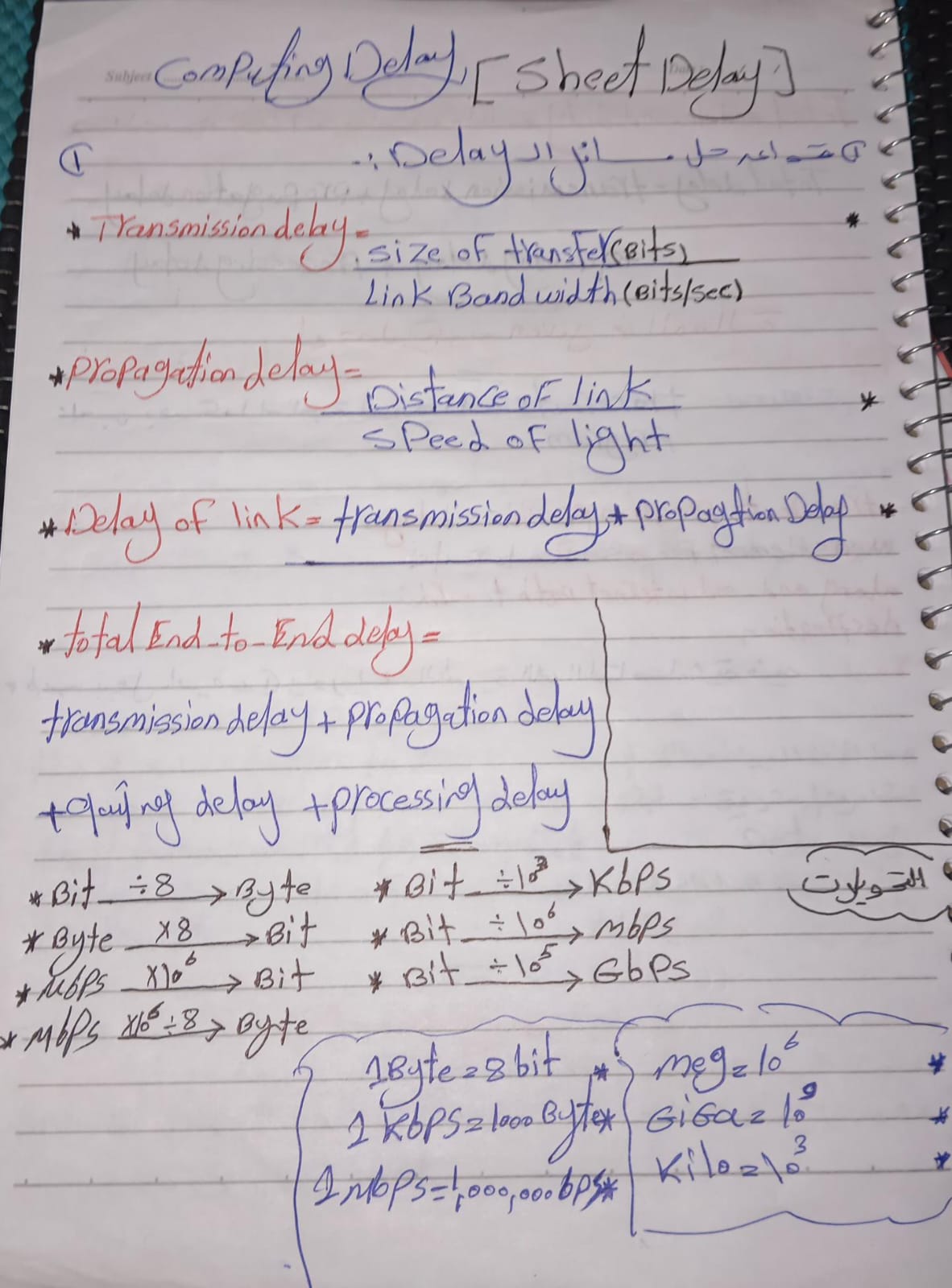
Part 2: Transmission vs Propagation
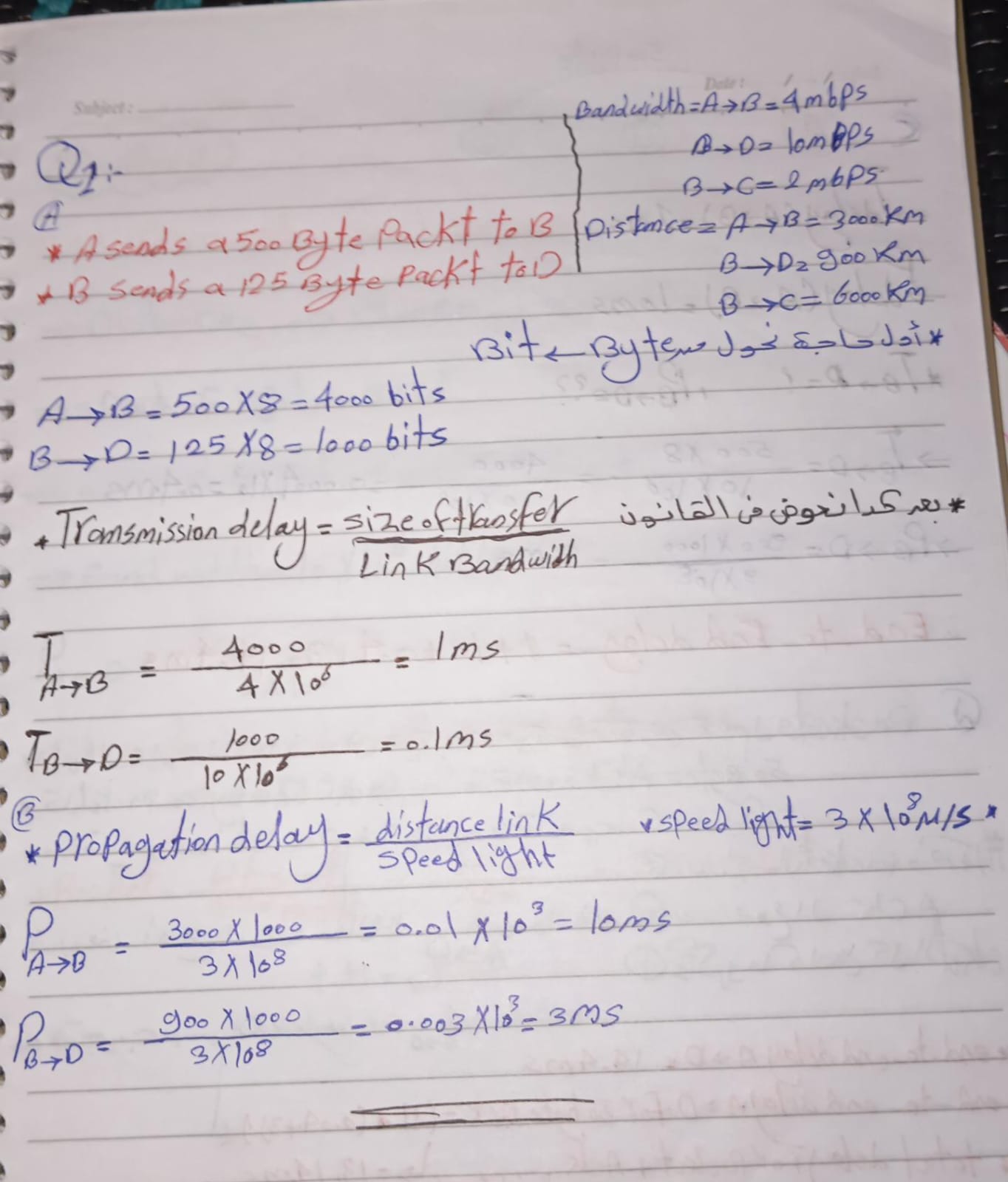
Part 3: Multi-hop Delay
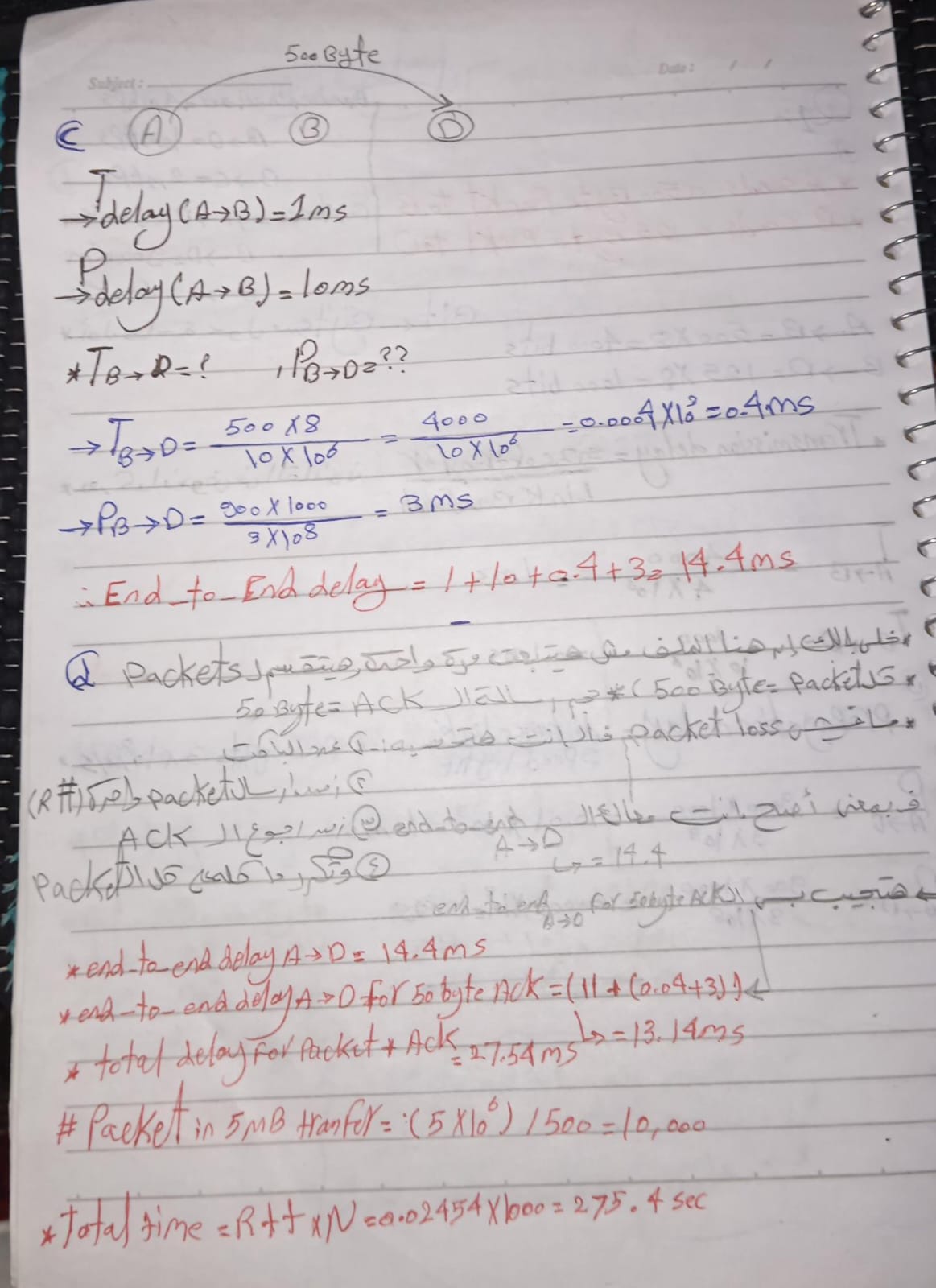
Part 4: Throughput & Capacity
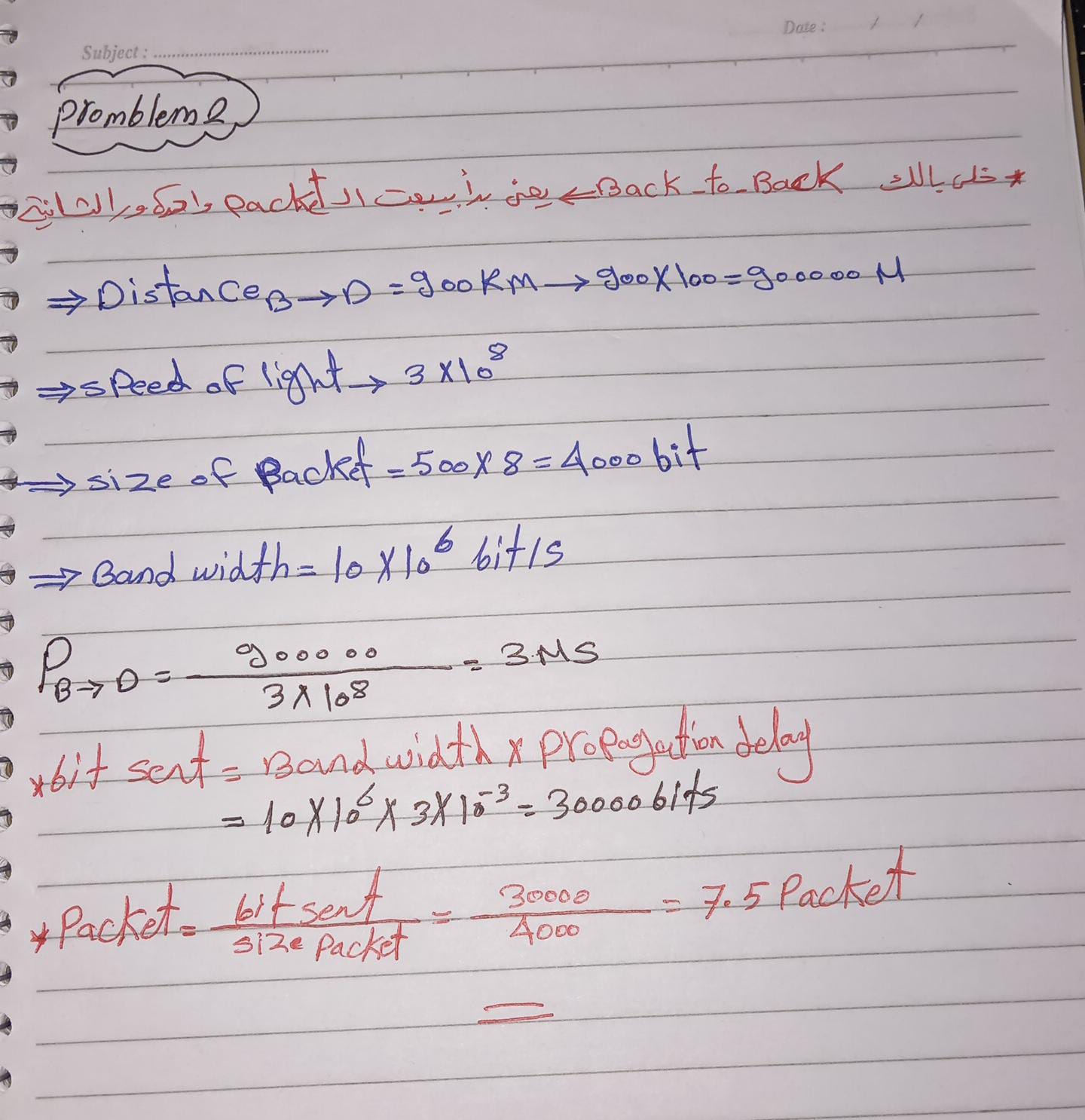
Quick Review:
- dtrans (Transmission Delay): The time taken to push all the packet's bits into the link. (L/R)
- dprop (Propagation Delay): The time for a bit to travel from the beginning of the link to the destination. (d/s)
- dend-to-end: The sum of processing, queuing, transmission, and propagation delays.
دراسة عميقة لبروتوكول الـ HTTP وكيفية عمل الـ Web Caching والـ DNS بالتفصيل.
HTTP Request Analysis
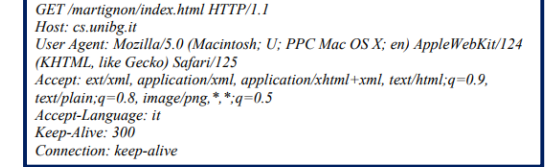
تحليل الرسالة: دي رسالة Request حقيقية، كل سطر فيها له معنى محدد بيساعد السيرفر يفهم المتصفح محتاج إيه.
http://cs.unibg.it/martignon/index.html
الـ URL الكامل بيجي من دمج الـ Host (العنوان) مع الـ Path
اللي جنب الـ GET.
HTTP/1.1
موجودة في أول سطر، والنسخة دي بتدعم الـ Persistent Connection بشكل أساسي.
Persistent (Durable)
الدليل هو سطر Connection: keep-alive، ده معناه إن الوصلة هتفضل مفتوحة
لطلبات تانية.
السطر بتاع User-Agent بيعرف السيرفر إنك داخل من Mac مثلاً وبتستخدم
Safari، فالسيرفر يحسن طريقة عرض الموقع ليك.
- Accept-Language: البراوزر بيقول للسيرفر أنا بفضل اللغة الإيطالية (it).
- Accept: قائمة بكل أنواع الملفات اللي البراوزر يقدر يفتحها (XML, HTML, PNG...).
- Keep-Alive 300: البراوزر بيطلب من السيرفر يسيب الوصلة مفتوحة لمدة 300 ثانية.
HTTP Connection Delays
Non-Persistent (Seq)
⚠️ كل ملف لازم يفتح وصلة TCP جديدة (2 RTT لكل ملف).
- Obj 1: 2 RTT + (20k/100k) = 4ms + 200ms = 204ms
- Obj 2: 2 RTT + (10k/100k) = 4ms + 100ms = 104ms
- Total = 308 ms
Persistent (No Pipe)
✅ بنفتح وصلة واحدة بس (1 RTT handshake للكل).
- Handshake: 2ms (1 RTT)
- Obj 1: 2ms (RTT) + 200ms (Trans) = 202ms
- Obj 2: 2ms (RTT) + 100ms (Trans) = 102ms
- Total = 306 ms
Problem 5: Comparison Result
2. (3 * 2ms) + Trans = 100ms → Trans Delay = 94ms (for 2 objects)
3. Avg Trans per obj = 94 / 2 = 47ms
4. Non-Persistent (3 objs) = 3 * (2 RTT + Trans)
5. Total = 3 * (4ms + 47ms) = 3 * 51ms = 153 ms
لو الـ Persistent لملفين خد 100ms، يبقى الـ Non-persistent لـ 3 ملفات ياخد كام؟ الشرح: بنحسب سرعة الملف الواحد الأول وبعدين نضربه في 3 مع مراعاة فرق الـ RTT.
🍪 Cookies Logic Problems
Q6: Re-issue
Day 0, 10, 20, 30.
4 timesQ7: Client Sends
Objs 2 to 6 (5 objs).
5 timesQ8: Capacity
4096 / 512
8 Cookies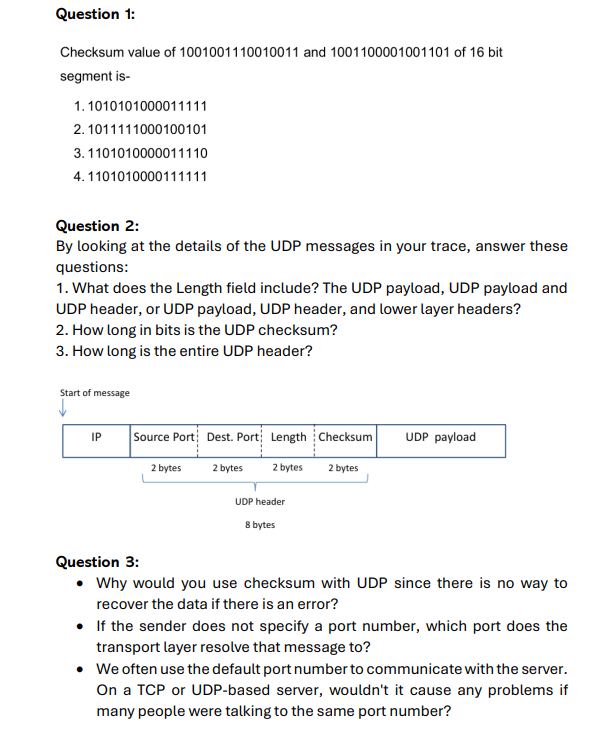
Problem Set: Transport Layer (UDP)
Question 2: UDP Trace Analysis
Answer: The UDP Length field includes the size of the UDP Header plus the UDP Payload (Data).
Answer: The UDP Checksum is always 16 bits (which is 2 bytes) long.
Answer: The entire UDP header is fixed at 8 Bytes (64 bits). It consists of four 2-byte fields.
Question 3: Conceptual Understanding
-
•
Why use Checksum with UDP if it can't recover data?
Answer: Even though UDP doesn't provide reliable delivery, the checksum is used to detect corruption. If a segment is damaged during transmission, the receiver discards it. This prevents corrupted data from being passed to the application, which could lead to application crashes or errors.
الغرض الأساسي هو "اكتشاف" الخطأ مش تصليحه. الـ Receiver لما بيلاقي الداتا بايظة بيرميها (Discard)، عشان ميسمحش لداتا فاسدة إنها توصل للبرامج وتعمل مشاكل أو تخلي البرنامج "يهنج". -
•
What if the sender doesn't specify a port number?
Answer: The operating system automatically assigns a dynamic port number, known as an Ephemeral Port, to the application. These ports are usually in the range above 1024 and are used for the duration of the communication session.
في الحالة دي الـ Windows أو نظام التشغيل بيتبرع للتطبيق برقم بورت "مؤقت" (Ephemeral Port) فوق الـ 1024 عشان الوصلة تمشي، وبمجرد ما الداتا تخلص البورت ده بيتحرر تاني. -
•
Can many users use the same server port simultaneously?
Answer: Yes, absolutely. The server distinguishes between different users based on their Source IP Address and Source Port Number. Even if everyone is hitting port 80, each user has a unique IP/Port combination that identifies their specific connection (Socket).
مبيحصلش "لخبطة" لأن السيرفر بيميز كل واحد عن طريق الـ IP بتاعه والبورت اللي هو فاتحه عنده (Source Port). فكل يوزر بيكون له "عنوان فريد" عند السيرفر حتى لو كلهم داخلين على نفس البوابة.
Q1: Stop-and-Wait (Window Size = 1)
Process: Since window size is 1, each packet must be acknowledged before the next is sent. When Pkt 1 is lost, its timer expires (Timeout) and the sender retransmits it. When ACK 150 is lost, the sender doesn't know the receiver got Pkt 2, so it retransmits Pkt 2 after timeout.
- باكت 1 ضاعت: السندر استنى وقت وبعتها تاني.
- لما ACK 150 ضاع: السندر افتكر إن الباكت موصلتش أصلاً، فبعت باكت رقم 2 مرة تانية بعد ما التايمر خلص.
Q2: Sliding Window (Size = 3)
Cumulative Buffer: Since Pkt 1 is missing, the receiver buffers Pkt 2, 3, and 4 but maintains its ACK at 20. Once the sender retransmits Pkt 1 and it arrives, the receiver can immediately ACK 160 (20+20+50+50+20), acknowledging the entire sequence it has collected.
Q1: Dijkstra's Shortest Path Algorithm
| Step | set N | D(B),p(B) | D(C),p(C) | D(D),p(D) | D(E),p(E) |
|---|---|---|---|---|---|
| 0 | A | 10, A | 3, A | ∞ | ∞ |
| 1 | AC | 7, C | -- | 11, C | 5, C |
| 2 | ACE | 7, C | -- | 11, C | -- |
| 3 | ACEB | -- | -- | 9, B | -- |
| 4 | ACEBD | -- | -- | -- | -- |
Step 1: We picked C (cost 3). Node B was 10
(via A), but via C it becomes 3 + 4 = 7. We update it.
Step 3: After picking B, we look at its neighbor D. Path via B
is 7 + 2 = 9, which is better than the current 11 (via C).
Q2: Distance Vector Logic (Node B)
| Dest | Cost via... | ||
|---|---|---|---|
| A | E | C | |
| A | 7 | 9 | 6 |
| C | 15 | 12 | 1 |
| D | 10 | 10 | 3 |
| E | 8 | 8 | 5 |
If the link A-E breaks, Node E will update its vector to A as ∞. It will then receive a vectors from B and D. Since B can reach A via C (cost 6), E will eventually learn a new path: E → D → C → B → A (Total cost = 2+2+1+7 = 12).